
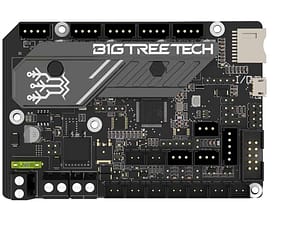
 SKR MINI E3 Motherboard V3.0 Bigtreetech Control Board 32 Bit for 3D printer
 Subtotal: ₹3,699.00

Motherboard & Display
- A 3D printer motherboard (also called a control board) is the central hub that connects and controls every electrical component in your printer—stepper motors, heaters, thermistors, endstops, fans, and sensors.
- It houses the microcontroller, which reads commands from your slicer/firmware (like Marlin or Klipper) and coordinates precise motion and temperature control to produce accurate 3D prints.
- Choosing the right board comes down to compatibility first, then deciding which quality-of-life upgrades are worth the extra cost.
- Display compatibility: Confirm the board supports your screen type (common options include 12864 LCD, TFT touchscreens, and OLED modules) and the correct connectors (EXP headers/UART depending on model).
- User experience: Touch TFTs are faster for navigation, while classic LCDs are simple, reliable, and widely supported.
- Standalone printing: A display with SD/microSD/USB print support lets you run jobs without keeping a computer connected
- On-screen controls: Look for quick access to preheat presets, filament load/unload, Z-offset, babystepping, fan speed, and PID tuning
- Status visibility: A good screen clearly shows nozzle/bed temps, print time, progress, speed/flow %, and error messages.
- Firmware support: Ensure your firmware (e.g., Marlin/Klipper setup) supports the display features you want (menus, icons, touch UI).
- Mounting & cabling: Check screen mounting options and cable length/routing—some TFTs need different cables or extra adapters.
- Upgrade path: If you plan future upgrades, choose a board that can support both LCD and TFT options (or has expansion for them).
How it works
-
Slicer creates G-code: Your 3D printing software converts a model into G-code instructions.
-
Firmware interprets commands: The motherboard’s microcontroller runs firmware that translates G-code into real-time actions
-
Motion control: Stepper drivers send signals to motors to move X/Y/Z and the extruder with exact steps.
-
Temperature control: The board reads thermistors and controls heaters using PID regulation for stable nozzle/bed temperatures.
Motherboard & Display
Showing 1–36 of 71 results










Features (what to look for)
- Printer compatibility: Match your printer’s voltage (12V/24V), motor count, endstops, thermistors, heaters, and wiring/connectors
- Microcontroller power: Faster 32-bit boards handle advanced features (input shaping, high-speed printing) more smoothly than older 8-bit boards
- Silent drivers (e.g., TMC series) reduce noise and improve smoothness.
-
Consider replaceable drivers vs integrated drivers for easier repairs/upgrades.
-
Firmware support: Strong support for Marlin or Klipper, plus an active community and clear documentation.
-
Connectivity & upgrades: USB, SD, Wi‑Fi add-ons, CAN support (on some setups), extra fan ports, LED ports, expansion headers.
-
Auto bed leveling support: Easy integration for BLTouch/CR Touch/inductive probes.
-
Quality-of-life & reliability: Better cooling layout, fused inputs, clean power regulation, clear labeling, and thermal runaway protection.
Safety monitoring
- Features like thermal runaway protection can shut down heaters if readings are abnormal.
FAQ
Q1: What does a 3D printer motherboard do?
It connects all printer electronics and uses a microcontroller + firmware to control movement, extrusion, and temperatures based on G-code.
Q2: How do I know if a motherboard is compatible with my 3D printer?
Check voltage (12V/24V), motor/driver count, connector types, supported thermistors/heaters, display compatibility, and firmware support.
Q3: Is a 32-bit motherboard worth it?
For most modern upgrades and smoother performance—especially higher speeds and advanced features—yes. For basic printing, many 8-bit boards still work.
Q4: What “quality-of-life” features matter most?
Silent stepper drivers, easy firmware updates, extra fan ports, auto bed leveling support, reliable power handling, and strong community documentation.
Q5: Will changing the motherboard improve print quality?
It can—especially if you gain quieter/cleaner motion control, better temperature stability, and modern firmware features—but tuning and mechanics still matter most.